

Purchase Grouping
What is Purchase Grouping?
Purchase grouping is the situation where a purchase you make on AppStore is grouped with multiple purchases and charged to you.
When does it happen?
Although Apple does not say anything specific about this, it occurs when multiple purchases are made through the AppStore recently.
How does it happen?
If you purchase something in an app and then make another purchase within a short time, Apple may combine the two transactions into a single invoice.
As a result, it is possible for you to think that more than one payment has been received unexpectedly in your accounts. But this is definitely not a mistake; it's just the App Store's purchase grouping policy.
Grouped payments are included under a consolidated invoice and can also be viewed from the history screen in the App Store as a single payment transaction (see Screenshot 1).
How can I view my combined invoice?
- Open the App Store application,
- Tap your profile photo in the upper right corner,
- On the screen that opens, find and tap the section where your name and surname are written,
- Select “Purchase History” on the screen that opens,
- Select relevant dates if necessary,
- Find the relevant purchase and tap on it
On this screen you can check your grouped invoice and see;
- Original purchase date
- The date that your card was charged
- The amount your card was charged
You can access the Apple support page here:
How apps, content, and subscriptions from Apple are billed
Screenshot 1
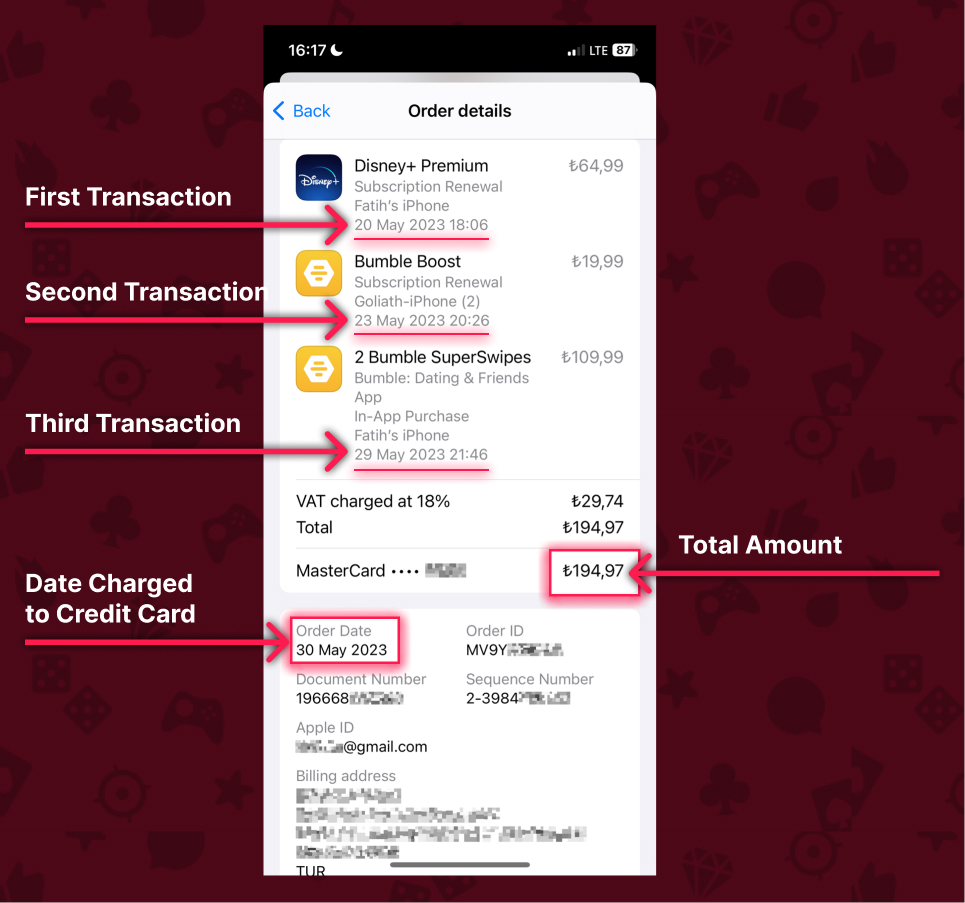
In the image above, purchases are made on May 20, 23, and 29, but the charges are collected from the credit card on May 30.